Category: React

What is React JS?

What is React JS?

Introduction

React, It is a very famous JavaScript libraries used for building complex user interfaces.It is created by Facebook in May 29, 2013. Nowadays 8789 top fortune companies are used react. For example Facebook itself, Netflix, Twitter, Uber, Airbnb etc.

When it compared with Angular, it is a framework but React is a library.not a framework.It is open-source project created by facebook. It used to create the view layer of an MVC application(Model View Controller).

What you need to know

When we look about JavaScript in distance it seems very difficult. But when give a try on it actually it is very easy to learn. All it does is creating DOM(Document Object Model) elements in form of components by using the virtual DOM.

When some one try to learn React he/she should know these skills mention in below:

  1. Basic familiarity with HTML5 & CSS
  2. Basic knowledge of JavaSCript
  3. Basic understanding of the DOM
  4. Familiarity with ES6 syntax and features
  5. How to use npm out of the nodeJS

React basic Concept
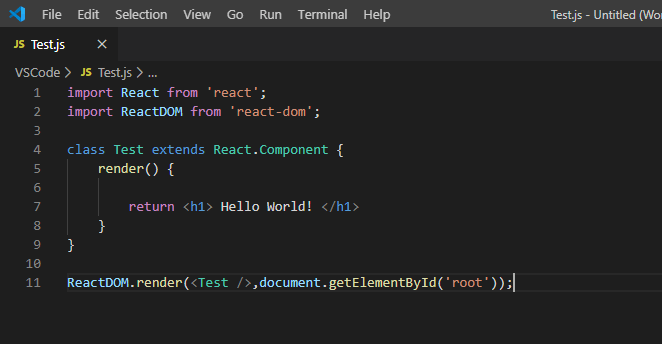
Fig 1:Basic Concept of react

React renders HTML to the web page by using a function called ReactDOM.render().

Creating React elements:
  1. Creating ES6 module pattern,we are importing our React and reactDOM from the downloaded packages into our script.
  2. In above figure(Fig 1) we are creating a component named Test using ES6 class feauture.The class is inherited from React in-built component class.Observe the ‘extends’ keyword.
  3. React’s render method returns on HTML element.This here is called JSX.

ReactDOM.render() Method :

Fig 2: render() Method

ReactDOM.render() function take two arguments, HTML code and an HTML element.The purpose of the function is to display the specified HTML code.

In our case, the ”<p> Hello World! </p>” inside the specified HTML element.This ”<p>Hello</p>” element is to be displayed inside the second argument(root).The root element is an HTML tags in the index.html page shown in next figure(Fig 3).
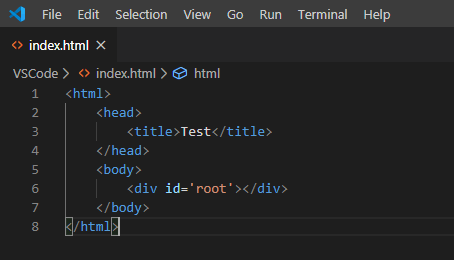
Fig 03: index.html

The index.html generated by create react installation has a <div> with the id of ‘root’. This is where the ReactDOM.render() method attaches our jsx components.
Click Here to learn React

Component Lifecycle in React

Component Lifecycle in React

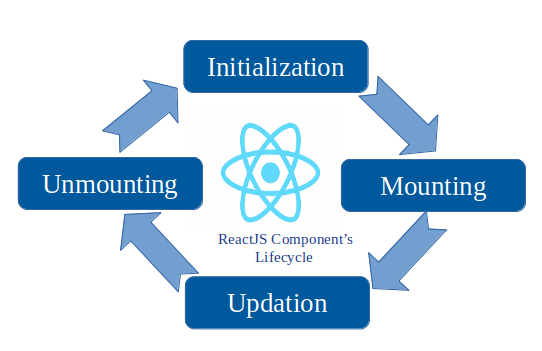
mounting and unmounting

Components in React have a lifecycle of events that we can easily subscribe to by defining the associated methods on our component definition object. Let’s go ahead and update our previous example to see this feature in action.

HelloMessage Component

Here we have updated our HelloMessage component to log to the console the following three React component lifecycle events:

  • componentWillMount
    • This event will be called right before a component mounts
  • componentDidMount
    • This event will be called right after a component mounts
  • componentWillUnmount
    • This event will be called right before a component unmounts

We are also logging our render method to the console so that we can see when the various lifecycle events occur relative to render.

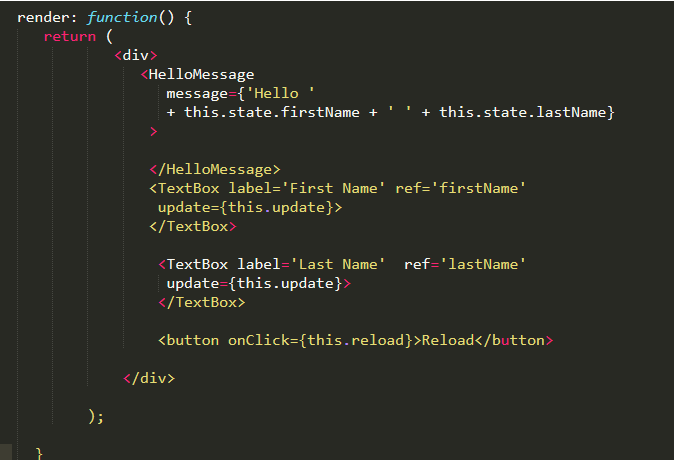
Let’s also update our HelloReact component to add a button that will reload our HelloMessagecomponent allowing us to see what happens when it unmounts. We’ve added this button to the render method shown in the following code:

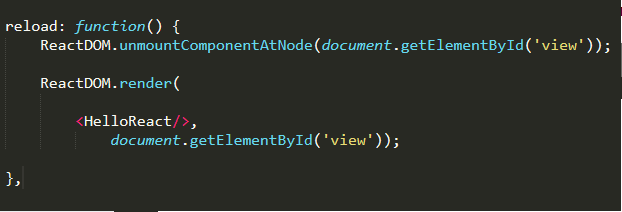
And then let us add a reload method to our HelloReact component that will call React.unmountComponentAtNode which will unmount our component. We then call ReactDOM.render to mount our component.

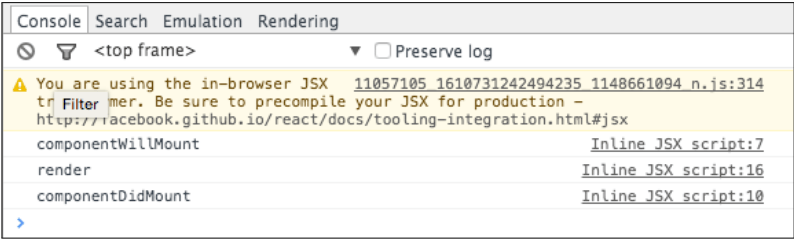
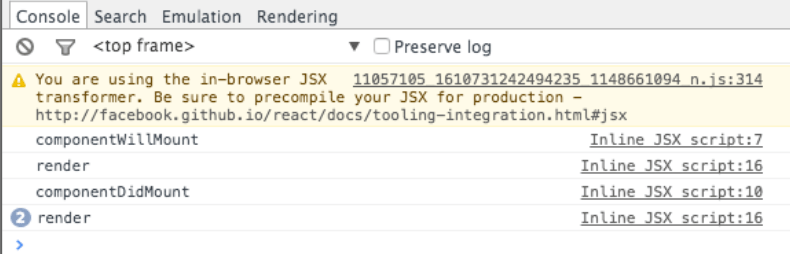
Now let’s go ahead and run the code in JsFiddle and open our browsers debugging tools (F12 in Chrome) so that we can see the console output. After running the code we see the following output:

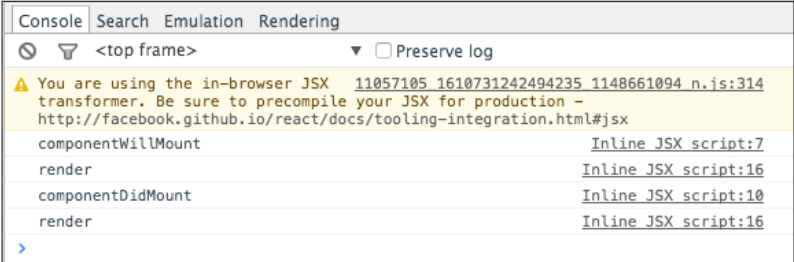
And as we can see we get a call to componentWillMount right before Render is called and then we get a call to componentDidMount right after render is called. This gives us an opportunity to run code both before and after our render method. Next let’s add a First Name and we can see what happens in the console as shown below:

We get one more call to render but componentWillMount and componentDidMountare not called because our HelloMessage component is already mounted and we are simply causing React to call the HelloMessage.render method. Let’s set a last name and look at the console output:

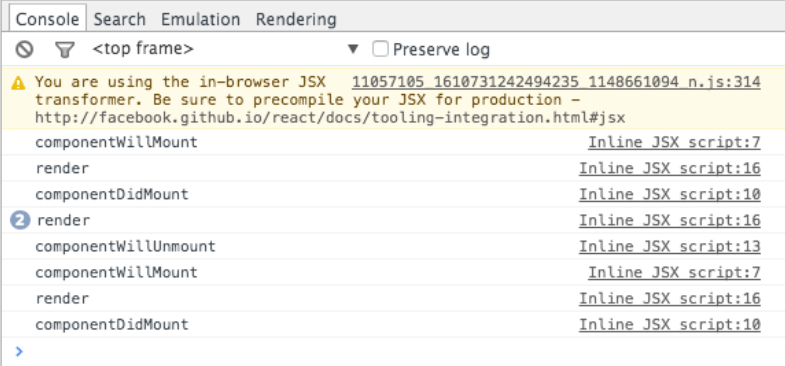
Probably no surprise here but we find that render is called again but that none of the lifecycle events are called. Next let’s click the Reload button and look at the following output:

Now we see that componentWillUnmount is called as our component is unmounted and then we repeat the same sequence we saw earlier as the component is mounted again.

Thank you!